自定义Data Service Providers —(9)关系
原文:https://www.cnblogs.com/tansm/archive/2010/06/10/DSP9.html
完整教程目录请参见:《自定义Data Service Providers — 简介》
在前面的章节中,我们创建了可以读/写的Data Service Provider,虽然看起来比较简陋,因为他缺少一个重要概念:关系。
那么,让我们重新修订一下我们的程序,来建立一个跟“真实”世界更相近的模型。
修改之前的类
还记得在之前的第三章节中,我们建立了一个Product类,现在我们再添加一个Category类,用来阐述一对多的关系。
public class Category
{
private List<Product> \_products = new List<Product>();
public int ID { get; set; }
public string Name { get; set; }
public List<Product> Products { get { return \_products; } }
}
public class Product
{
public int ProdKey { get; set; }
public string Name { get; set; }
public Decimal Price { get; set; }
public Decimal Cost { get; set; }
public Category Category { get; set; }
}
修改元数据定义
通过元数据建立关系
现在我们已经定义好了实体类,下一步我们需要向Data Services暴露Product和Category之间的关系。
处理描述关系外,大部分还是比较简单的。
我们开始创建“导航”属性:
var productType = …; // Product在Data Services中的ResourceType
var categoryType = …; // Category 在Data Services中的ResourceType
// 通知 Data Services,Product包含Category 的引用
var prodCategory = new ResourceProperty(
"Category",
ResourcePropertyKind.ResourceReference,
categoryType
);
productType.AddProperty(prodCategory);
// 通知 Data Services ,Category包含Products 集合属性
var catProducts = new ResourceProperty(
"Products",
ResourcePropertyKind.ResourceSetReference,
productType
);
categoryType.AddProperty(catProducts);
由于API设计原理的原因,你必须在创建完所有的专用属性后,再创建和添加导航属性到属性集的末尾部分。
这意味这你需要建立两个方法,一个方法用于添加专用属性(Primitive Properties),一个用于添加导航属性(Navigation Properties)。
你还需要注意到,Product.Category是一个引用属性(ResourceReference),相当于 1…0,1的关系,他指向一个(或0个)Category。而Catrgory.Products是一个集合属性(ResourceSetReference),相当于 1…0,n的关系,他指向一批Product。
现在我们还需要为Category和Product建立两个资源集:
var productsSet = new ResourceSet("Products", productType);
var categoriesSet = new ResourceSet("Categories", categoryType);
做完这些后,我们还需要创建AssociationSet,用来将两个导航属性和资源集联系在一起。
ResourceAssociationSet productCategoryAssociationSet = new ResourceAssociationSet(
"ProductCategory",
new ResourceAssociationSetEnd(
productsSet,
productType,
prodCategory
),
new ResourceAssociationSetEnd(
categoriesSet,
categoryType,
catProducts
)
);
上面的代码意思是告诉Data Services:
product.Category = category;
等同于:
category.Products.Add(product);
下一步,我们需要找个地方存放ResourceAssociationSet的值,我选择放在CustomState属性上:
prodCategory.CustomState = productCategoryAssociationSet;
catProducts.CustomState = productCategoryAssociationSet;
如果你以前做过VB开发,你应该记得Form表单上有个Tag属性可以存放任何类型的临时数据,这个ResourceProperty.CustomState也是相同的意思。
其实将ResourceAssociationSet存储到ResourceProperty.CustomState属性上并不是必须的,这里我们只是为了简化我们的代码,方便后面的访问。
最后,我们还需要将这些元数据定义提交给DSPMetadataProvider,包括两个资源类型(ResourceType),两个资源集(ResourceSet),以及一个关系(ResourceAssociationSet)。
metadata.AddResourceType(productType);
metadata.AddResourceSet(productsSet);
metadata.AddResourceType(categoryType);
metadata.AddResourceSet(categoriesSet);
metadata.AddAssociationSet(productCategoryAssociationSet);
修改IDataServiceMetadataProvider定义
我们还需要修改DSPMetadataProvider代码,让其支持关系。
首先定义一个变量记录关系的定义。
List<ResourceAssociationSet> \_associationSets
= new List<ResourceAssociationSet>();
然后我们添加一个方法用于加入关系定义。
public void AddAssociationSet(ResourceAssociationSet aset)
{
\_associationSets.Add(aset);
}
最后,我们还需要更新IDataServiceMetadataProvider.GetResourceAssociationSet(..)方法:
public virtual ResourceAssociationSet GetResourceAssociationSet(
ResourceSet resourceSet,
ResourceType resourceType,
ResourceProperty resourceProperty
)
{
return resourceProperty.CustomState as ResourceAssociationSet
}
你应该还记得上面我们将关系放在CustomState上,在这里就派上用场了。
当然你如果不喜欢这种方法,你还可以使用LINQ在_associationSets上查询,但是显然这样会慢而且复杂了些。
看看元数据是否工作
我们可以通过在浏览器中键入: http://localhost/sample.svc来查看服务契约,或者http://localhost/samplesvc/$metadata来查看元数据信息。(在VS调试环境下需要加入对应的动态端口)。
下一步,我们开始修改IDataServiceQueryProvider,来让查询和更新可以正常工作。
查询
更新数据源
现在,我们需要在ProductsContext上添加一个Categories属性用来存放分类列表,对应的属性也要添加。
public class ProductsContext: DSPContext
{
private static List<Product> \_products
= new List<Product>();
private static List<Category> \_categories
= new List<Category>();
public override IQueryable GetQueryable(
ResourceSet resourceSet)
{
if (resourceSet.Name == "Products")
return Products.AsQueryable();
else if (resourceSet.Name == "Categories")
return Categories.AsQueryable();
throw new NotSupportedException(
string.Format("{0} not found", resourceSet.Name));
}
public static List<Product> Products{
get { return \_products; }
}
public static List<Category> Categories {
get { return \_categories; }
}
public override void AddResource(
ResourceType resourceType, object resource)
{
if (resourceType.InstanceType == typeof(Product))
{
Product p = resource as Product;
if (p != null)
{
Products.Add(p);
return;
}
}
else if (resourceType.InstanceType == typeof(Category))
{
Category c = resource as Category;
if (c != null)
{
Categories.Add(c);
return;
}
}
throw new NotSupportedException(
string.Format("{0} not found", resourceType.FullName));
}
public override void DeleteResource(object resource)
{
if (resource.GetType() == typeof(Product))
{
Products.Remove(resource as Product);
return;
}
else if (resource.GetType() == typeof(Category))
{
Categories.Remove(resource as Category);
return;
}
throw new NotSupportedException("Resource Not Found");
}
public override object CreateResource(
ResourceType resourceType)
{
if (resourceType.InstanceType == typeof(Product))
return new Product();
else if (resourceType.InstanceType == typeof(Category))
return new Category();
throw new NotSupportedException(
string.Format("{0} not found", resourceType.FullName));
}
public override void SaveChanges()
{
var prodKey = Products.Max(p => p.ProdKey);
foreach (var prod in Products.Where(p => p.ProdKey == 0))
prod.ProdKey = ++prodKey;
var catKey = Categories.Max(p => p.ID);
foreach (var cat in Categories.Where(c => c.ID == 0))
cat.ID = ++catKey;
}
}
正如你所看见的,我只是很机械的增加了对应的代码。在真实的环境下,我肯定会重构这部分代码,要是再加入一个新的类型我就会更痛苦了。
但是,在这里我就不管这么多了,让我们继续其他的内容。
现在就剩下添加一些测试数据了。
protected override ProductsContext CreateDataSource()
{
if (ProductsContext.Products.Count == 0)
{
var bovril = new Product
{
ProdKey = 1,
Name = "Bovril",
Cost = 4.35M,
Price = 6.49M
};
var marmite = new Product
{
ProdKey = 2,
Name = "Marmite",
Cost = 4.97M,
Price = 7.21M
};
var food = new Category
{
ID = 1,
Name = "Food"
};
food.Products.Add(bovril);
bovril.Category = food;
food.Products.Add(marmite);
marmite.Category = food;
ProductsContext.Categories.Add(food);
ProductsContext.Products.Add(bovril);
ProductsContext.Products.Add(marmite);
}
return base.CreateDataSource();
}
你需要注意的是,在上面的代码中Product和Category使用了两段代码建立了双向的关系,但是在诸如Entity Framework这样的系统中,不需要两边都建立关系,仅建立一边的关系,那么EF会自动建立另外一边的关系。
不管咋样,我们运行代码就能够看见这些关系已经开始工作了。
例如:获取某个物料的分类
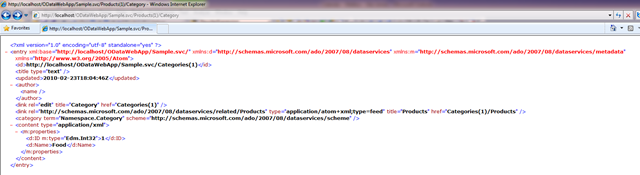
以及获取一个分录下的所有物料
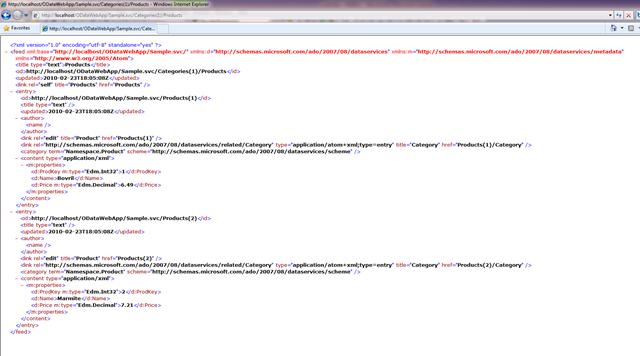
有趣的是,我们并没有对IDataServiceQueryProvider进行任何修改,其查询就已经正常工作了。
更新部分的修改
最后,我们将完成难度比较大的更新部分。
基本上就是实现之前未实现的三个方法,还记得之前的这段代码吗?
public void SetReference(
object targetResource,
string propertyName,
object propertyValue)
{
throw new NotImplementedException();
}
public void AddReferenceToCollection(
object targetResource,
string propertyName,
object resourceToBeAdded)
{
throw new NotImplementedException();
}
public void RemoveReferenceFromCollection(
object targetResource,
string propertyName,
object resourceToBeRemoved)
{
throw new NotImplementedException();
}
你应该还记得,在之前关于更新的代码中,我们都是将所有的操作延迟到IDataServiceUpdateProvider.SaveChanges()上批量执行的,在当前的SetReference方法上我们也是这么干。
为方便起见,我这里先罗列一部分方法,实际真实的代码在后面:
public void SetReference(
object targetResource,
string propertyName,
object propertyValue)
{
\_actions.Add(() => ReallySetReference(
targetResource,
propertyName,
propertyValue));
}
public void AddReferenceToCollection(
object targetResource,
string propertyName,
object resourceToBeAdded)
{
\_actions.Add(() => ReallyAddReferenceToCollection(
targetResource,
propertyName,
resourceToBeAdded));
}
public void RemoveReferenceFromCollection(
object targetResource,
string propertyName,
object resourceToBeRemoved)
{
\_actions.Add(() => ReallyRemoveReferenceFromCollection(
targetResource,
propertyName,
resourceToBeRemoved));
}
那么这些ReallyXXX()这样的方法是啥样子的呢?
在我们的实体类(Product和Category)中,关系是双向的,但是我们的类并没有自动维护其双向的关系,所以这里我们必须自己手工修复这种关系。
ReallySetReference(…)看起来像这样的。
public void ReallySetReference(
object targetResource,
string propertyName,
object propertyValue)
{
// 获取资源的CLR类型.
var targetType = targetResource.GetType();
// 找到CLR Type对应的ResourceType
var targetResourceType =
\_metadata.Types.Single(t => t.InstanceType==targetType);
var targetResourceTypeProperty = targetResourceType
.Properties
.Single(p => p.Name == propertyName);
var associationSet = targetResourceTypeProperty
.CustomState as ResourceAssociationSet
// 获取关系
var relatedAssociationSetEnd = associationSet.End1
.ResourceProperty == targetResourceTypeProperty ?
associationSet.End2 : associationSet.End1;
var relatedResourceTypeProperty = relatedAssociationSetEnd
.ResourceProperty;
// 获取关联的类型和属性
Type relatedType = relatedAssociationSetEnd
.ResourceType
.InstanceType;
var targetTypeProperty = targetType
.GetProperties()
.Single(p => p.Name == propertyName);
var relatedTypeProperty =
relatedResourceTypeProperty == null ?
null :
relatedType.GetProperties()
.Single(p => p.Name == relatedResourceTypeProperty.Name);
// 我们需要修正关系的另外一段
if (relatedResourceTypeProperty != null)
{
// 获取另外一段的关系和值
object originalValue = targetTypeProperty
.GetPropertyValueFromTarget(targetResource);
if (originalValue != null)
{
if (relatedAssociationSetEnd.ResourceProperty.Kind ==
ResourcePropertyKind.ResourceReference)
{
// the other end is a reference so we check
// that it is pointing to the targetResource
// before nulling out.
var backPointer =
relatedTypeProperty
.GetPropertyValueFromTarget(originalValue);
if (object.ReferenceEquals(
backPointer,
targetResource)
)
relatedTypeProperty.SetPropertyValueOnTarget(
originalValue, null);
}
else if (relatedAssociationSetEnd
.ResourceProperty.Kind ==
ResourcePropertyKind.ResourceSetReference)
{
// the other end is a collection
// (i.e. a List in our implementation) so we can
// safely remove targetResource without checking
// whether it is in that list or not
(relatedTypeProperty
.GetPropertyValueFromTarget(originalValue)
as IList
).Remove(targetResource);
}
}
// Add the relationship to the other end...
if (propertyValue != null)
{
if (relatedAssociationSetEnd.ResourceProperty.Kind ==
ResourcePropertyKind.ResourceReference)
{
relatedTypeProperty.SetPropertyValueOnTarget(
propertyValue, targetResource);
}
else if (relatedAssociationSetEnd
.ResourceProperty.Kind ==
ResourcePropertyKind.ResourceSetReference)
{
(relatedTypeProperty
.GetPropertyValueFromTarget(propertyValue)
as IList
).Add(targetResource);
}
}
}
// actually set the reference !
targetTypeProperty.SetPropertyValueOnTarget(
targetResource, propertyValue
);
}
看起来很复杂,但是如果你仔细看这些代码应该能够找到修复关系的逻辑。事实上,如果Product和Category是很固定的关系,使用下面的代码就足够了:
public void ReallySetReference(
object targetResource,
string propertyName,
object propertyValue)
{
// Get the resource type.
var targetType = targetResource.GetType();
var targetTypeProperty = targetType
.GetProperties()
.Single(p => p.Name == propertyName);
// actually set the reference !
targetTypeProperty.SetPropertyValueOnTarget(
targetResource, propertyValue
);
}
正如你所看见的,这要好多了,如果你使用自己的DSP扩展不妨可以使用这段代码。
在这段程序中,我还使用了”扩展方法”功能,这让代码书写起来更平滑。
public static void SetPropertyValueOnTarget(
this PropertyInfo property,
object target,
object value)
{
property.GetSetMethod()
.Invoke(target,new object\[\] { value });
}
public static object GetPropertyValueFromTarget(
this PropertyInfo property,
object target)
{
return property.GetGetMethod()
.Invoke(target, new object\[\] { });
}
下一步,我们还需要实现ReallyRemoveReferenceFromCollection(..) 和 ReallyAddReferenceToCollection(..),已实现双向的同步。
但是!我想把这些内容留给聪明的作者。
当我们完成这些实现,我们就完成了“强类型,支持关系的Data Service”了。
让我们庆祝吧!